How to Post a Carousel on LinkedIn (Step by Step)
A LinkedIn carousel is a PDF posted as a document - there's no carousel button. Here's exactly how to upload one, step by step, plus the size and file rules that stop it looking wrong.
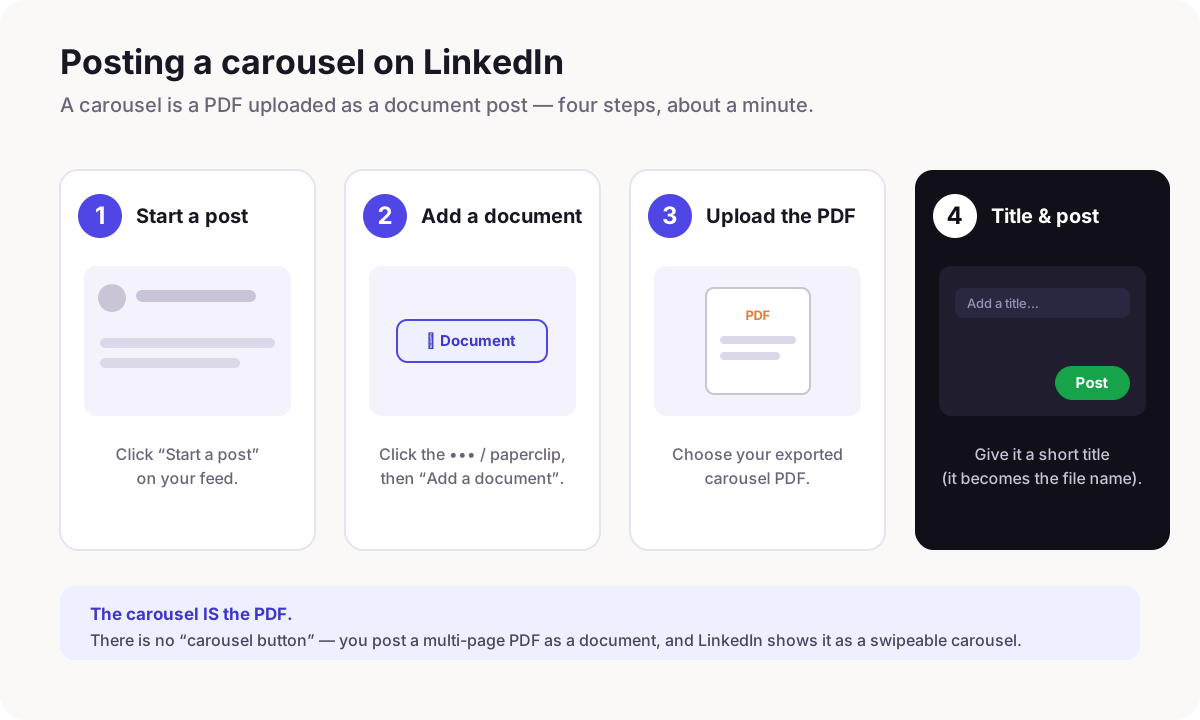
There is no "carousel" button on LinkedIn. A carousel is a multi-page PDF posted as a document. Click Start a post, choose Add a document (the ▦ / paperclip icon), upload your PDF, give it a short title, and post. LinkedIn turns the pages into a swipeable carousel. Export the PDF at portrait 4:5 or square 1:1 so it fills the feed on mobile.
The single most common thing that trips people up: they look for a "carousel" option on LinkedIn and can't find one. That's because there isn't one. What everyone calls a LinkedIn carousel is a **document post** - a normal PDF, uploaded as a document, that LinkedIn renders as swipeable pages. Once you know that, posting one takes about a minute.
Here's the whole flow.
Step by step
- →Export your carousel as a single PDF. In Reathy, that's one click - the whole carousel becomes one PDF, already the right size.
- →On LinkedIn, click Start a post (on desktop or the mobile app).
- →Click the ••• more icon or the paperclip, then choose Add a document.
- →Upload your PDF and give it a short title. The title becomes the document's file name and shows above the carousel, so make it a hook, not "Untitled".
- →Write your post text above it (the first line is what shows before "see more"), then click Post.
The file rules that matter
Two things decide whether it looks sharp or awkward: the shape and the file. Get these right and the upload just works.
| Setting | Use this |
|---|---|
| File type | PDF (a multi-page PDF = a carousel) |
| Shape | Portrait 4:5 (1080 × 1350) or square 1:1 (1080 × 1080) |
| Pages / slides | Up to ~300, but 6–10 reads best |
| Max file size | 300 MB (you'll never get close) |
| Title | Short and hook-like - it shows above the carousel |
Why the shape matters so much
Most people read LinkedIn on a phone. A portrait 4:5 PDF fills far more of the screen than a landscape one, so it stops the scroll and is easier to read. If you export a wide, landscape PDF, it shows up as a thin strip that nobody swipes. When in doubt, go portrait. The full breakdown of sizes and specs is in its own guide.
Common problems (and fixes)
- →"There's no carousel option." Correct - use Add a document and upload a PDF. That is the carousel.
- →"It posted as a link/thumbnail, not a carousel." You attached the PDF as a link or image. Remove it and use Add a document instead.
- →"It looks tiny / cut off." Your PDF is landscape or an odd size. Re-export at portrait 4:5 or square 1:1.
- →"The pages are blurry." The PDF was exported at low resolution or a screenshot was used. Export a proper vector/high-res PDF - Reathy does this by default.
Make the carousel in a minute, then post it
The fastest path: write your slides as text in Reathy, pick a theme, export the PDF at portrait 4:5, and follow the four steps above. No design tools, and the file comes out the right size so the upload just works.

Frequently asked questions
How do I post a carousel on LinkedIn?
Click Start a post, choose Add a document (the ▦ or paperclip icon), upload a multi-page PDF, give it a short title, and post. There is no separate carousel button - a carousel is just a PDF posted as a document, which LinkedIn shows as swipeable pages.
Why can't I find the carousel option on LinkedIn?
Because there isn't one. What people call a carousel is a document post. Instead of looking for "carousel", use Add a document and upload your PDF - LinkedIn renders the pages as a swipeable carousel automatically.
What size should the carousel PDF be?
Portrait 4:5 (1080 × 1350 px) is best because it fills the most space on mobile; square 1:1 (1080 × 1080) also works. Avoid landscape - it shows as a thin strip. Six to ten pages reads best.
Can I post a carousel from my phone?
Yes. The LinkedIn mobile app supports document posts: Start a post, tap the document icon, and pick your PDF. The steps are the same as on desktop.
Make your carousel now
Free to start - 5 slides per carousel and 20 exports a month. No design skills needed.
Open the editor